MomahSelect
- Guide
- _MomahSelect.cshtml
The _MomahSelect.cshtml is a custom, reusable dropdown component designed to replace the standard HTML <select>. It supports both single and multiple selections, searching/filtering, progressive enhancement, programmatic updates, and custom callbacks.
UI Preview
| State | Preview |
|---|---|
| Single Select |  |
| Multi Select | 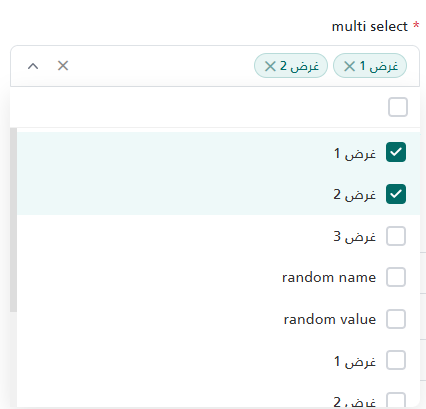 |
| Single Filter |  |
| Multi Filter | 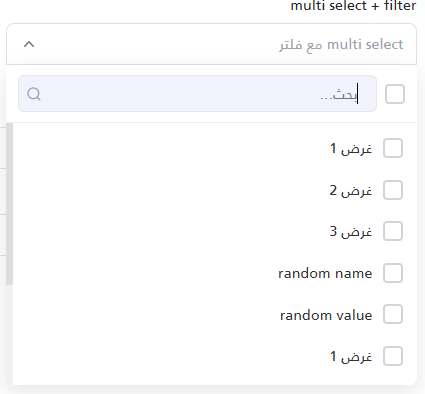 |
Properties
The component accepts properties ideally via an anonymous object. It also provides backward compatibility for Tuples.
Configuration Properties
| Property | Type | Default Value | Description |
|---|---|---|---|
Id | string | "" | Required. A unique identifier for the component. Used to generate element IDs. |
Options | List<(string Value, string Text)> | null | The list of options to display in the dropdown. |
Label | string | "" | The label text displayed above the input. If empty, the <label> element is omitted. |
Required | bool | false | Marks the input as required. Displays a * next to the label and enables validation logic. |
Placeholder | string | "" | The placeholder text to display when no option is chosen. |
Type | string | "single" | Determines the selection mode. Accepts "single" or "multiple". |
Filter | string | null | Enables the search/filter input. Any non-null value activates it. Note: Multi-select ALWAYS has search enabled. |
Clear | string | null | Enables a clear ('✕') button upon selection. Any non-null value enables it. |
OnChange | string | null | The name of a global JavaScript function to call when the selection changes. Receives (selectedValue, id). |
(Note: If passing a Tuple instead of an anonymous object, use this exact order: (Label, Required, Id, Placeholder, Options, Type, Filter, Clear, OnChange))
Usage Examples
1. Basic Single Select
A standard single-select dropdown without search or clearing.
@await Html.PartialAsync("UI/_MomahSelect", new
{
    Id = "UserRole",
    Label = "Select Role",
    Required = true,
    Placeholder = "Choose a role...",
    Options = new List<(string, string)>
    {
        ("1", "Admin"),
        ("2", "User"),
        ("3", "Manager")
    }
})
2. Multi-Select with Search & Clear Button
Use Type = "multiple" to show a multiple layout with checkboxes and tag chips. Multiselect handles internal searching automatically.
@await Html.PartialAsync("UI/_MomahSelect", new
{
    Id = "AssignedServices",
    Label = "Assign Services",
    Required = false,
    Placeholder = "Select services",
    Type = "multiple",
    Clear = "true", // Allows clearing the entire selection
    Options = new List<(string, string)>
    {
        ("srv1", "Service 1"),
        ("srv2", "Service 2"),
        ("srv3", "Service 3")
    }
})
<!-- or -->

<partial name="UI/_MomahSelect"
	model='new { Label = "multi select + filter", Required = false, Id = "my-multi-select-2", Placeholder = "multi select مع فلتر", Options = selectFieldOptions, Type = "multiple", Filter = "filter", Clear = "clear" }' />
3. Single Select with Filter & OnChange Callback
Activating the search bar for a single selection and reacting via a Javascript callback.
@await Html.PartialAsync("UI/_MomahSelect", new
{
    Id = "CitySelect",
    Label = "City",
    Placeholder = "Search city...",
    Filter = "true",
    OnChange = "onCityChanged",
    Options = new List<(string, string)>
    {
        ("c1", "Cairo"),
        ("c2", "Alexandria")
    }
})

<script>
    function onCityChanged(selectedValue, inputId) {
        console.log("The component " + inputId + " changed value to: " + selectedValue);
    }
</script>
JavaScript API
The component exposes a global JavaScript API for fetching data and programmatic control.
Getting the Selected Value
// Returns a string (or null/empty) for 'single'
// Returns an array of strings for 'multiple'
var roleVal = window.getSelectedValue("UserRole");
Setting the Selected Value
// For single select (use the value of the option)
window.setSelectValue("UserRole", "2");

// For multi-select (accepts an array of string values)
window.setSelectValue("AssignedServices", ["srv1", "srv2"]);
Updating Options Dynamically (e.g., via AJAX)
// Replaces the entire list of options and clears the ongoing selection
var newOptions = [
    { value: "4", text: "Editor" },
    { value: "5", text: "Viewer" }
];
window.setSelectOption("UserRole", newOptions);
Programmatic Validation
// Manually triggers validation checks
// Returns true if valid, false if invalid. Displays error state UI automatically.
var isValid = window.validateSelect_UserRole();
@using System.Runtime.CompilerServices
@using Microsoft.AspNetCore.Routing
@model dynamic
@{
string Label = "";
bool Required = false;
string Id = "";
string Placeholder = "";
List<(string Value, string Text)> Options = null;
string Type = "single";
string Filter = null;
string Clear = null;
string OnChange = null;
if (Model is ITuple tuple)
{
Label = tuple[0]?.ToString();
Required = (bool)tuple[1];
Id = tuple[2]?.ToString();
Placeholder = tuple[3]?.ToString();
Options = (List<(string Value, string Text)>)tuple[4];
Type = tuple.Length > 5 ? tuple[5]?.ToString() : "single";
Filter = tuple.Length > 6 ? tuple[6]?.ToString() : null;
Clear = tuple.Length > 7 ? tuple[7]?.ToString() : null;
OnChange = tuple.Length > 8 ? tuple[8]?.ToString() : null;
}
else if (Model != null)
{
var props = new RouteValueDictionary(Model);
if (props.TryGetValue("Label", out var label)) Label = label?.ToString();
if (props.TryGetValue("Required", out var req)) Required = Convert.ToBoolean(req);
if (props.TryGetValue("Id", out var id)) Id = id?.ToString();
if (props.TryGetValue("Placeholder", out var defText)) Placeholder = defText?.ToString();
if (props.TryGetValue("Options", out var opts)) Options = opts as List<(string Value, string Text)>;
if (props.TryGetValue("Type", out var type)) Type = type?.ToString() ?? "single";
if (props.TryGetValue("Filter", out var filter)) Filter = filter?.ToString();
if (props.TryGetValue("Clear", out var clear)) Clear = clear?.ToString();
if (props.TryGetValue("OnChange", out var onChange)) OnChange = onChange?.ToString();
}
if (string.IsNullOrEmpty(Type)) Type = "single";
var isMultiple = Type.Equals("multiple", StringComparison.OrdinalIgnoreCase);
}
<style>
/* ═══════════════ Shared Styles ═══════════════ */
.cs-container { position: relative; width: 100%; }
.cs-trigger {
display: flex; align-items: center; width: 100%; min-height: 42px;
padding: 5px 12px; border: 1px solid #dee2e6; border-radius: 8px;
background: #fff; cursor: pointer; user-select: none;
transition: border-color .2s, box-shadow .2s; gap: 6px;
}
.cs-trigger.cs-open { border-bottom-left-radius: 0; border-bottom-right-radius: 0; }
.cs-chevron {
width: 20px; height: 20px; margin-right: 4px; flex-shrink: 0;
transition: transform .2s; fill: #6b7280;
}
.cs-open .cs-chevron { transform: rotate(180deg); }
.cs-dropdown {
display: none; position: absolute;
background: #fff; border-top: none; border-radius: 0 0 8px 8px;
box-shadow: 0 8px 24px rgba(0,0,0,.1); z-index: 99999;
max-height: 320px; flex-direction: column;
}
.cs-dropdown.cs-visible { display: flex; }
.cs-search-row {
display: flex; align-items: center; gap: 8px;
padding: 10px 12px; border-bottom: 1px solid #f0f0f0;
}
.cs-search-wrap { flex: 1; position: relative; display: flex; align-items: center; }
.cs-search-input {
width: 100%; border: 1px solid #e5e7eb; border-radius: 6px;
padding: 7px 18px 7px 10px; font-size: .875rem; outline: none;
transition: border-color .2s;
}
.cs-search-icon {
position: absolute; left: 8px; top: 50%; transform: translateY(-50%);
width: 16px; height: 16px; fill: none; stroke: #9ca3af;
stroke-width: 2; pointer-events: none;
}
.cs-options { overflow-y: auto; flex: 1; padding: 4px 0; }
.cs-no-results { padding: 14px; text-align: center; color: #9ca3af; font-size: .875rem; }
/* ═══════════════ Single Select ═══════════════ */
.ss-display-text {
flex: 1; font-size: .9rem; color: #333;
overflow: hidden; text-overflow: ellipsis; white-space: nowrap;
}
.ss-display-text.ss-placeholder { color: #9ca3af; }
.ss-option {
display: flex; align-items: center; gap: 10px; padding: 10px 14px;
cursor: pointer; font-size: .9rem; color: #333; transition: background .1s;
}
.ss-option:hover { background: #f5fffe; }
.ss-option.ss-selected { background: #eef9f9; color: #026B66; font-weight: 500; }
.ss-option-text { flex: 1; }
/* ═══════════════ Multi Select ═══════════════ */
.ms-chips {
flex: 1; display: flex; flex-wrap: nowrap; align-items: center;
gap: 5px; overflow: hidden; min-width: 0;
}
.ms-placeholder-text { color: #9ca3af; font-size: .9rem; white-space: nowrap; }
.ms-chip {
display: inline-flex; align-items: center; gap: 4px;
background: #e8f5f4; border: 1px solid #b8dbd9; border-radius: 14px;
padding: 2px 8px 2px 10px; font-size: .82rem; color: #026B66;
white-space: nowrap; line-height: 1.4; max-width: 140px;
}
.ms-chip-text { overflow: hidden; text-overflow: ellipsis; white-space: nowrap; }
.ms-chip-remove {
cursor: pointer; color: #6b9f9d; font-size: .85rem; line-height: 1;
font-weight: bold; transition: color .1s; display: flex; align-items: center;
}
.ms-chip-remove:hover { color: #dc3545; }
.ms-chip-overflow { font-size: .8rem; color: #6b7280; white-space: nowrap; flex-shrink: 0; }
.ms-select-all-check {
width: 20px; height: 20px; border-radius: 4px; border: 2px solid #d1d5db;
cursor: pointer; display: flex; align-items: center; justify-content: center;
flex-shrink: 0; transition: all .15s; background: #fff;
}
.ms-select-all-check.ms-checked,
.ms-select-all-check.ms-partial { background: #026B66; border-color: #026B66; }
.ms-select-all-check .ms-icon-check,
.ms-select-all-check .ms-icon-minus { display: none; }
.ms-select-all-check.ms-checked .ms-icon-check { display: block; }
.ms-select-all-check.ms-partial .ms-icon-minus { display: block; }
.ms-option {
display: flex; align-items: center; gap: 10px; padding: 10px 14px;
cursor: pointer; font-size: .9rem; color: #333; transition: background .1s;
}
.ms-option:hover { background: #f5fffe; }
.ms-option.ms-selected { background: #eef9f9; }
.ms-option-check {
width: 20px; height: 20px; border-radius: 4px; border: 2px solid #d1d5db;
flex-shrink: 0; display: flex; align-items: center; justify-content: center;
transition: all .15s; background: #fff;
}
.ms-option.ms-selected .ms-option-check { background: #026B66; border-color: #026B66; }
.ms-option-check svg { display: none; }
.ms-option.ms-selected .ms-option-check svg { display: block; }
.ms-option-text { flex: 1; }
/* ═══════════════ Clear Button ═══════════════ */
.cs-clear {
display: none; align-items: center; justify-content: center;
width: 20px; height: 20px; flex-shrink: 0;
cursor: pointer;font-size: .8rem; color: #888; font-weight: bold;
}
.cs-trigger.cs-has-value .cs-clear { display: flex; }
/* ═══════════════ Validation ═══════════════ */
.select-input-wrapper.is-invalid .cs-trigger {
border-color: #dc3545 !important;
box-shadow: 0 0 0 3px rgba(220,53,69,.15) !important;
}
/* Hidden native select */
.cs-native-select {
position: absolute; opacity: 0; width: 1px; height: 1px;
z-index: -1; border: 0; padding: 0; margin: -1px;
overflow: hidden; clip: rect(0,0,0,0); pointer-events: none;
}
</style>
<div class="@(string.IsNullOrEmpty(Label) ? "mt-3" : "")">
@if (!string.IsNullOrEmpty(Label))
{
<label class="form-label text-gray-700" for="@Id">
@if (Required) { <span class="text-danger">*</span> }
@Label
</label>
}
<div class="select-input-wrapper" id="@Id-wrapper" data-placeholder="@Placeholder">
<!-- Hidden native select for form submission -->
<select name="@Id" id="@Id" class="cs-native-select"
@(isMultiple ? "multiple=\"multiple\"" : "")
@(Required ? "required" : "")>
@if (!isMultiple)
{
<option value="">@Placeholder</option>
}
@if (Options != null)
{
foreach (var option in Options)
{
<option value="@option.Value">@option.Text</option>
}
}
</select>
<!-- Custom select UI -->
<div class="cs-container" id="@Id-cs">
<div class="cs-trigger" id="@Id-trigger">
@if (isMultiple)
{
<div class="ms-chips" id="@Id-chips">
<span class="ms-placeholder-text">@Placeholder</span>
</div>
}
else
{
<span class="ss-display-text ss-placeholder" id="@Id-display">@Placeholder</span>
}
@if (!string.IsNullOrEmpty(Clear))
{
<span class="cs-clear" id="@Id-clear" title="مسح">✕</span>
}
<svg class="cs-chevron" viewBox="0 0 20 20">
<path fill-rule="evenodd"
d="M5.23 7.21a.75.75 0 011.06.02L10 11.168l3.71-3.938a.75.75 0 111.08 1.04l-4.25 4.5a.75.75 0 01-1.08 0l-4.25-4.5a.75.75 0 01.02-1.06z" />
</svg>
</div>
<div class="cs-dropdown" id="@Id-dropdown">
@if (isMultiple || !string.IsNullOrEmpty(Filter))
{
<div class="cs-search-row">
@if (isMultiple)
{
<div class="ms-select-all-check" id="@Id-selectall" title="تحديد الكل">
<svg class="ms-icon-check" width="14" height="14" viewBox="0 0 14 14" fill="none">
<path d="M11.6666 3.5L5.24998 9.91667L2.33331 7" stroke="white" stroke-width="2"
stroke-linecap="round" stroke-linejoin="round" />
</svg>
<svg class="ms-icon-minus" width="14" height="14" viewBox="0 0 14 14" fill="none">
<path d="M3 7H11" stroke="white" stroke-width="2" stroke-linecap="round" />
</svg>
</div>
}
@if (!string.IsNullOrEmpty(Filter))
{
<div class="cs-search-wrap">
<input type="text" class="cs-search-input" id="@Id-search"
placeholder="بحث..." autocomplete="off" />
<svg class="cs-search-icon" viewBox="0 0 24 24">
<circle cx="11" cy="11" r="8" />
<line x1="21" y1="21" x2="16.65" y2="16.65" />
</svg>
</div>
}
</div>
}
<div class="cs-options" id="@Id-options">
@if (Options != null && Options.Count > 0)
{
foreach (var option in Options)
{
if (isMultiple)
{
<div class="ms-option" data-value="@option.Value">
<div class="ms-option-check">
<svg width="14" height="14" viewBox="0 0 14 14" fill="none">
<path d="M11.6666 3.5L5.24998 9.91667L2.33331 7"
stroke="white" stroke-width="2"
stroke-linecap="round" stroke-linejoin="round" />
</svg>
</div>
<span class="ms-option-text">@option.Text</span>
</div>
}
else
{
<div class="ss-option" data-value="@option.Value">
<span class="ss-option-text">@option.Text</span>
</div>
}
}
}
else
{
<div class="cs-no-results">لا توجد نتائج</div>
}
</div>
</div>
</div>
</div>
@if (Required)
{
<div class="text-danger small mt-1" id="@Id-error" style="display: none;">@Label مطلوب</div>
}
</div>
<script>
(function () {
var id = '@Id';
var isMultiple = @(isMultiple ? "true" : "false");
var placeholder = $('#' + id + '-wrapper').attr('data-placeholder');
var $el = $('#' + id);
var $wrapper = $('#' + id + '-wrapper');
var $errorDiv = $('#' + id + '-error');
var $trigger = $('#' + id + '-trigger');
var $dropdown = $('#' + id + '-dropdown');
var $search = $('#' + id + '-search');
var $optionsContainer = $('#' + id + '-options');
var $clearBtn = $('#' + id + '-clear');
// ── SVG snippets ──────────────────────────────────────────────────────────
var CHECK_SVG = '<svg width="14" height="14" viewBox="0 0 14 14" fill="none">' +
'<path d="M11.6666 3.5L5.24998 9.91667L2.33331 7" stroke="white" ' +
'stroke-width="2" stroke-linecap="round" stroke-linejoin="round"/></svg>';
// ── HTML builders (single source of truth) ────────────────────────────────
function buildSingleOptionHtml(opt) {
return '<div class="ss-option" data-value="' + opt.value + '">' +
'<span class="ss-option-text">' + opt.text + '</span></div>';
}
function buildMultiOptionHtml(opt) {
return '<div class="ms-option" data-value="' + opt.value + '">' +
'<div class="ms-option-check">' + CHECK_SVG + '</div>' +
'<span class="ms-option-text">' + opt.text + '</span></div>';
}
var buildOptionHtml = isMultiple ? buildMultiOptionHtml : buildSingleOptionHtml;
// ── Validation ────────────────────────────────────────────────────────────
function clearValidation() {
$wrapper.removeClass('is-invalid').addClass('is-valid');
$errorDiv.hide();
}
function validateSelect() {
var isReq = $el.attr('required') !== undefined;
var val = $el.val();
var empty = !val || (Array.isArray(val) && val.length === 0) || val === '';
if (isReq && empty) {
$wrapper.addClass('is-invalid').removeClass('is-valid');
$errorDiv.show();
return false;
}
clearValidation();
return true;
}
function revalidateIfNeeded() {
if ($wrapper.hasClass('is-invalid') || $wrapper.hasClass('is-valid')) {
validateSelect();
} else {
clearValidation();
}
}
// ── Callback ──────────────────────────────────────────────────────────────
function triggerCallback() {
var fn = '@OnChange';
if (fn && typeof window[fn] === 'function') window[fn]($el.val(), id);
}
// ── Dropdown toggle ───────────────────────────────────────────────────────
$trigger.on('click', function (e) {
if ($(e.target).closest('.ms-chip-remove').length) return;
e.stopPropagation();
var isOpen = $dropdown.hasClass('cs-visible');
closeAllDropdowns();
if (!isOpen) {
$('body').append($dropdown);
var offset = $trigger.offset();
$dropdown.css({
top: offset.top + $trigger.outerHeight(),
left: offset.left,
width: $trigger.outerWidth()
});
$dropdown.addClass('cs-visible');
$trigger.addClass('cs-open');
$search.val('').trigger('input');
setTimeout(function () { $search.focus(); }, 50);
}
});
$(document).on('click.cs_' + id, function (e) {
if (!$(e.target).closest('#' + id + '-cs').length && !$(e.target).closest('#' + id + '-dropdown').length) {
$dropdown.removeClass('cs-visible');
$trigger.removeClass('cs-open');
}
});
function closeAllDropdowns() {
$('.cs-dropdown').removeClass('cs-visible');
$('.cs-trigger').removeClass('cs-open');
}
// Reposition on window resize
$(window).on('resize.cs_' + id + ' scroll.cs_' + id, function() {
if ($dropdown.hasClass('cs-visible')) {
var offset = $trigger.offset();
$dropdown.css({
top: offset.top + $trigger.outerHeight(),
left: offset.left,
width: $trigger.outerWidth()
});
}
});
// ── Search ────────────────────────────────────────────────────────────────
$search.on('input', function () {
var term = $(this).val().toLowerCase();
var optSelector = isMultiple ? '.ms-option' : '.ss-option';
var textSelector = isMultiple ? '.ms-option-text' : '.ss-option-text';
var hasResults = false;
$optionsContainer.find(optSelector).each(function () {
var match = !term || $(this).find(textSelector).text().toLowerCase().indexOf(term) > -1;
$(this).toggle(match);
if (match) hasResults = true;
});
$optionsContainer.find('.cs-no-results').remove();
if (!hasResults) $optionsContainer.append('<div class="cs-no-results">لا توجد نتائج</div>');
if (isMultiple) updateSelectAllState();
});
// ═══════════════════════════════════════════════════════════════════════════
// MODE: SINGLE SELECT
// ═══════════════════════════════════════════════════════════════════════════
if (!isMultiple) {
var $display = $('#' + id + '-display');
var selectedValue = '';
function setSingleHasValue(has) {
$trigger.toggleClass('cs-has-value', has);
}
$optionsContainer.on('click', '.ss-option', function () {
var val = $(this).data('value').toString();
var text = $(this).find('.ss-option-text').text();
$optionsContainer.find('.ss-option').removeClass('ss-selected');
selectedValue = val;
$(this).addClass('ss-selected');
$el.val(val);
$display.text(text).removeClass('ss-placeholder');
setSingleHasValue(true);
$dropdown.removeClass('cs-visible');
$trigger.removeClass('cs-open');
clearValidation();
triggerCallback();
});
// Clear button
$clearBtn.on('click', function (e) {
e.stopPropagation();
resetSingle();
setSingleHasValue(false);
revalidateIfNeeded();
triggerCallback();
});
// Internal reset helper
function resetSingle() {
selectedValue = '';
$el.val('');
$display.text(placeholder).addClass('ss-placeholder');
$optionsContainer.find('.ss-option').removeClass('ss-selected');
}
// Select a value programmatically
function applySingleValue(v) {
var $opt = $optionsContainer.find('.ss-option[data-value="' + v + '"]');
$optionsContainer.find('.ss-option').removeClass('ss-selected');
if ($opt.length) {
var text = $opt.find('.ss-option-text').text();
selectedValue = v.toString();
$opt.addClass('ss-selected');
$el.val(v);
$display.text(text).removeClass('ss-placeholder');
setSingleHasValue(true);
} else {
resetSingle();
setSingleHasValue(false);
}
}
// Public: replace options list
window['setSelectOptions_' + id] = function (newOptions) {
$el.empty().append($('<option>').val('').text(placeholder));
$optionsContainer.empty();
resetSingle();
if (newOptions && newOptions.length > 0) {
newOptions.forEach(function (opt) {
$el.append($('<option>').val(opt.value).text(opt.text));
$optionsContainer.append(buildOptionHtml(opt));
});
} else {
$optionsContainer.append('<div class="cs-no-results">لا توجد نتائج</div>');
}
revalidateIfNeeded();
};
// Public: set selected value – accepts a single value OR an array (first element used)
window['setSelectValues_' + id] = function (value) {
var v = Array.isArray(value) ? (value.length > 0 ? value[0] : '') : (value != null ? value : '');
applySingleValue(v.toString());
clearValidation();
};
// ═══════════════════════════════════════════════════════════════════════════
// MODE: MULTI SELECT
// ═══════════════════════════════════════════════════════════════════════════
} else {
var $chipsContainer = $('#' + id + '-chips');
var $selectAll = $('#' + id + '-selectall');
var selectedValues = [];
var MAX_VISIBLE_CHIPS = 3;
function syncToNative() { $el.val(selectedValues); }
function updateChips() {
$chipsContainer.empty();
if (selectedValues.length === 0) {
$chipsContainer.append($('<span>').addClass('ms-placeholder-text').text(placeholder));
return;
}
selectedValues.slice(0, MAX_VISIBLE_CHIPS).forEach(function (v) {
var $opt = $optionsContainer.find('.ms-option[data-value="' + v + '"]');
var text = $opt.length ? $opt.find('.ms-option-text').text() : v;
$chipsContainer.append(
'<span class="ms-chip">' +
'<span class="ms-chip-text">' + text + '</span>' +
'<span class="ms-chip-remove" data-val="' + v + '">✕</span>' +
'</span>'
);
});
var overflow = selectedValues.length - MAX_VISIBLE_CHIPS;
if (overflow > 0) $chipsContainer.append('<span class="ms-chip-overflow">...+' + overflow + '</span>');
}
function updateSelectAllState() {
var visibleOptions = $optionsContainer.find('.ms-option:visible');
var allVisibleValues = visibleOptions.map(function () { return $(this).data('value').toString(); }).get();
var cnt = allVisibleValues.filter(function (v) { return selectedValues.indexOf(v) > -1; }).length;
$selectAll.removeClass('ms-checked ms-partial');
if (visibleOptions.length === 0) return;
if (cnt === allVisibleValues.length) $selectAll.addClass('ms-checked');
else if (cnt > 0) $selectAll.addClass('ms-partial');
}
function afterChange() {
syncToNative();
updateChips();
updateSelectAllState();
$trigger.toggleClass('cs-has-value', selectedValues.length > 0);
clearValidation();
triggerCallback();
}
// Clear button (multi)
$clearBtn.on('click', function (e) {
e.stopPropagation();
selectedValues = [];
$optionsContainer.find('.ms-option').removeClass('ms-selected');
afterChange();
revalidateIfNeeded();
});
// Option click
$optionsContainer.on('click', '.ms-option', function () {
var val = $(this).data('value').toString();
var idx = selectedValues.indexOf(val);
if (idx > -1) { selectedValues.splice(idx, 1); $(this).removeClass('ms-selected'); }
else { selectedValues.push(val); $(this).addClass('ms-selected'); }
afterChange();
});
// Select-all click
$selectAll.on('click', function () {
var visibleOptions = $optionsContainer.find('.ms-option:visible');
var allVisibleValues = visibleOptions.map(function () { return $(this).data('value').toString(); }).get();
var allSelected = allVisibleValues.every(function (v) { return selectedValues.indexOf(v) > -1; });
if (allSelected) {
allVisibleValues.forEach(function (v) {
var idx = selectedValues.indexOf(v);
if (idx > -1) selectedValues.splice(idx, 1);
});
visibleOptions.removeClass('ms-selected');
} else {
allVisibleValues.forEach(function (v) {
if (selectedValues.indexOf(v) === -1) selectedValues.push(v);
});
visibleOptions.addClass('ms-selected');
}
afterChange();
});
// Chip remove
$chipsContainer.on('click', '.ms-chip-remove', function (e) {
e.stopPropagation();
var val = $(this).data('val').toString();
var idx = selectedValues.indexOf(val);
if (idx > -1) {
selectedValues.splice(idx, 1);
$optionsContainer.find('.ms-option[data-value="' + val + '"]').removeClass('ms-selected');
}
afterChange();
});
// Public: replace options list
window['setSelectOptions_' + id] = function (newOptions) {
$el.empty();
$optionsContainer.empty();
selectedValues = [];
updateChips();
updateSelectAllState();
syncToNative();
if (newOptions && newOptions.length > 0) {
newOptions.forEach(function (opt) {
$el.append($('<option>').val(opt.value).text(opt.text));
$optionsContainer.append(buildOptionHtml(opt));
});
} else {
$optionsContainer.append('<div class="cs-no-results">لا توجد نتائج</div>');
}
revalidateIfNeeded();
};
// Public: set selected values – accepts an array of values
window['setSelectValues_' + id] = function (valuesArr) {
selectedValues = [];
$optionsContainer.find('.ms-option').removeClass('ms-selected');
if (valuesArr && valuesArr.length > 0) {
valuesArr.forEach(function (v) {
var $opt = $optionsContainer.find('.ms-option[data-value="' + v + '"]');
if ($opt.length) {
selectedValues.push(v.toString());
$opt.addClass('ms-selected');
}
});
}
syncToNative();
updateChips();
updateSelectAllState();
$trigger.toggleClass('cs-has-value', selectedValues.length > 0);
clearValidation();
};
}
// ── Global helpers (registered once per page via guard) ───────────────────
if (!window.getSelectedValue) {
window.getSelectedValue = function (inputId) {
var $input = $('#' + inputId);
if (!$input.length) { console.warn("Select '" + inputId + "' not found"); return null; }
if ($input.prop('multiple')) { var v = $input.val(); return v ? v : []; }
var v = $input.val();
return (v === '' || v == null) ? null : v;
};
}
// Convenience wrappers that accept the id as the first argument
window.setSelectOption = function (inputId, newOptions) {
var fn = window['setSelectOptions_' + inputId];
if (fn) fn(newOptions);
else console.warn("setSelectOption: select '" + inputId + "' not found");
};
window.setSelectValue = function (inputId, value) {
var fn = window['setSelectValues_' + inputId];
if (fn) fn(value);
else console.warn("setSelectValue: select '" + inputId + "' not found");
};
// ── Validation hooks ──────────────────────────────────────────────────────
$el.on('invalid', function (e) {
e.preventDefault();
if (!validateSelect()) {
var form = this.form;
var firstInvalid = form ? form.querySelector(':invalid') : null;
if (!form || firstInvalid === this) {
if (!$dropdown.hasClass('cs-visible')) $trigger.trigger('click');
}
}
});
$(document).on('submit', 'form', function (e) {
if ($(this).find('#' + id).length > 0 && !validateSelect()) {
e.preventDefault();
var firstInvalid = $(this).find('.is-invalid').first();
if (firstInvalid.length === 0 || firstInvalid[0] === $wrapper[0]) {
if (!$dropdown.hasClass('cs-visible')) $trigger.trigger('click');
}
}
});
window['validateSelect_' + id] = validateSelect;
})();
</script>