InputField
- Guide
- _InputField.cshtml
UI Preview
| State | Preview |
|---|---|
| Single Input |  |
| Group Inputs | 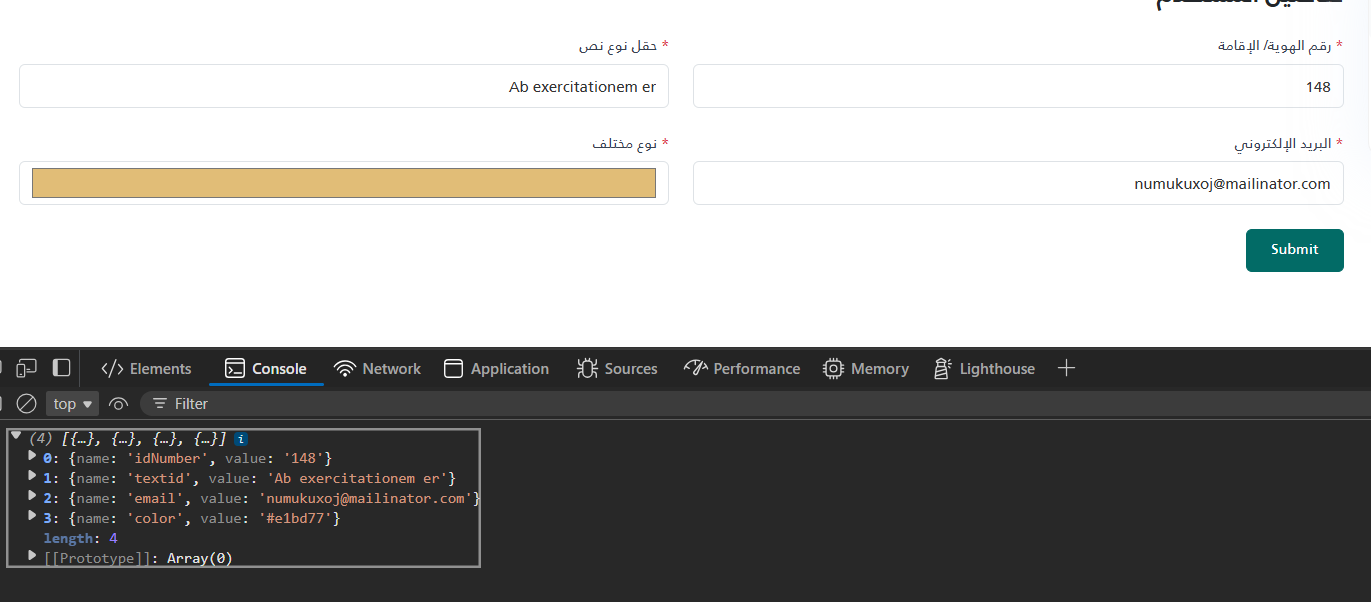 |
@using System.Runtime.CompilerServices
@model ITuple
@{
var label = (string)Model[0];
var required = (bool)Model[1];
var id = (string)Model[2];
var rawPlaceholder = (string)Model[3];
var placeholder = string.IsNullOrEmpty(rawPlaceholder) ? "يكتب النص هنا" : rawPlaceholder;
// Safely handle optional 5th parameter for Type
var type = (Model.Length > 4 && Model[4] != null) ? (string)Model[4] : "text";
if (string.IsNullOrEmpty(type))
{
type = "text";
}
}
<style>
	input[type=number]::-webkit-outer-spin-button,
	input[type=number]::-webkit-inner-spin-button {
		-webkit-appearance: none;
		margin: 0;
	}

	input {
		-moz-appearance: textfield;
		appearance: textfield;
		direction: rtl;
		text-align: right;
	}
</style>
<div class="mb-4">
	<label class="form-label text-gray-700" for="@id">
		@if (required)
		{
		<span class="text-danger">*</span>
		}
		@label
	</label>
	<input type="@type" id="@id" name="@id" class="form-control" placeholder="@placeholder" @(required ? "required" : ""
		) />
</div>
How to use
<partial name="_InputField" model='("اسم الحقل الاختياري", false, "field-id2", "")' />
<partial name="_InputField" model='("رقم الهوية/ الإقامة", true, "idNumber", " رقم الهوية/ الإقامة", "number")' />
<partial name="_InputField" model='("حقل نوع نص", true, "textid", " نص تجريبي")' />
<partial name="_InputField" model='("البريد الإلكتروني", true, "email", " البريد الإلكتروني", "email")' />

@* No value *@
<partial name="UI/_InputField" model='("حقل نوع نص", true, "textid", " نص تجريبي")' />

@* With value *@
<partial name="UI/_InputField" model='("حقل نوع نص", true, "textid2", " نص تجريبي")'
	view-data='new ViewDataDictionary(ViewData) { { "Value", "القيمة الافتراضية" } }' />

@* With type + value *@
<partial name="UI/_InputField" model='("حقل نوع ايميل", true, "emailid", " email address", "email")'
        view-data='new ViewDataDictionary(ViewData) { { "Value", "mail@domain.com" } }' />
| Parameter | Type | Description | Default Value |
|---|---|---|---|
| Label | string | The label of the input field | "" |
| Required | bool | Whether the input field is required or not | false |
| Id | string | The ID of the input field | "" |
| Placeholder | string | The placeholder of the input field | "" |
| Type | string | The type of the input field | "text" |
@using System.Runtime.CompilerServices
@model ITuple
@{
var label = (string)Model[0];
var required = (bool)Model[1];
var id = (string)Model[2];
var rawPlaceholder = (string)Model[3];
var placeholder = string.IsNullOrEmpty(rawPlaceholder) ? "يكتب النص هنا" : rawPlaceholder;
// Safely handle optional 5th parameter for Type
var type = (Model.Length > 4 && Model[4] != null) ? (string)Model[4] : "text";
if (string.IsNullOrEmpty(type))
{
type = "text";
}
// Optional value passed via view-data: new ViewDataDictionary(ViewData) { { "Value", "..." } }
var value = ViewData["Value"] as string ?? "";
}
<style>
	input[type=number]::-webkit-outer-spin-button,
	input[type=number]::-webkit-inner-spin-button {
		-webkit-appearance: none;
		margin: 0;
	}

	input {
		-moz-appearance: textfield;
		appearance: textfield;
		direction: rtl;
		text-align: right;
	}
</style>
<div class="mb-4">
	<label class="form-label text-gray-700" for="@id">
		@if (required)
		{
		<span class="text-danger">*</span>
		}
		@label
	</label>
	<input type="@type" id="@id" name="@id" class="form-control" placeholder="@placeholder" value="@value" @(required ? "required" : ""
		) />
</div>