CkEditor
- Guide
- _CkEditor.cshtml
The _CKEditor.cshtml is a reusable partial view that integrates CKEditor 5 (Classic Build) into any Razor page with built-in validation, dynamic sizing, and automatic data synchronization.
UI Preview
| State | Preview |
|---|---|
| Default | 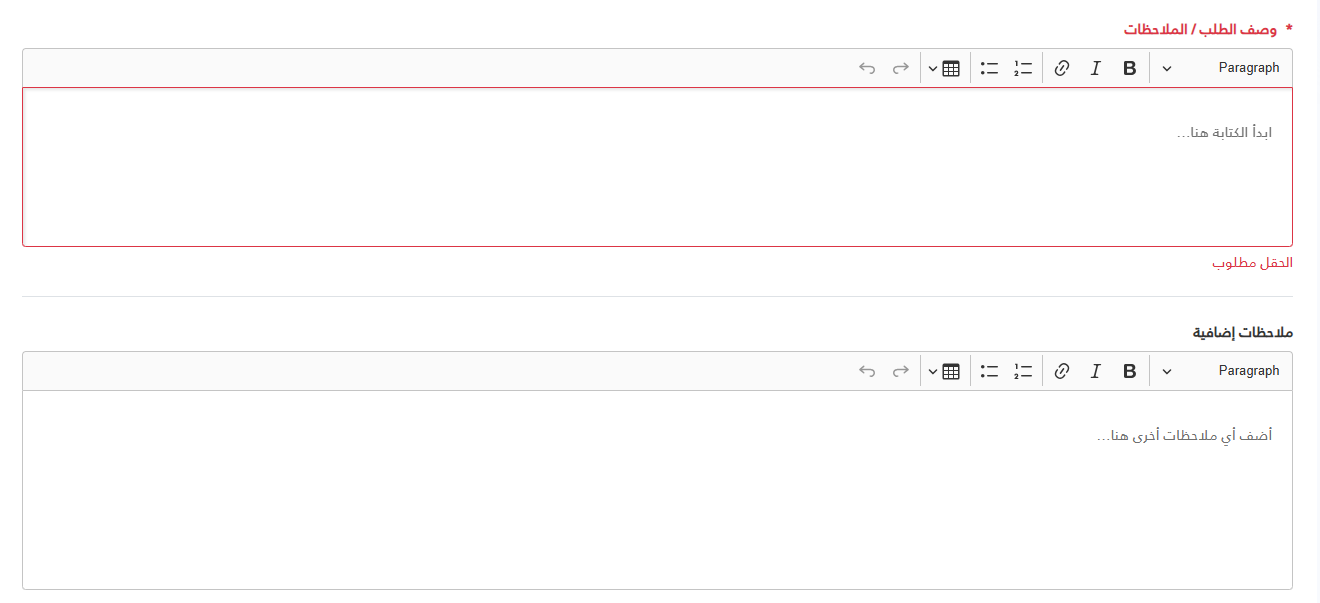 |
Basic Usage
You can use the partial by passing an anonymous object as the model:
<partial name="UI/_CKEditor"
         model='new { Id = "description", Label = "Description", Required = true }' />

  @await Html.PartialAsync("UI/_CKEditor", new {
      id = "editor1",
      label = "وصف الحالة",
      required = true,
      height = "200px"
  })

<!-- readonly version -->
  @await Html.PartialAsync("UI/_CKEditor", new {
      id = "editor2",
      label = "ملخص القضية (للعرض فقط)",
      value = readonlyContent,
      @readonly = true,
      height = "320px"
  })
Available Properties
| Property | Type | Default | Description |
|---|---|---|---|
Id | string | Required | The unique ID for the textarea and editor instance. |
Label | string | "" | The label text displayed above the editor. |
Required | bool | false | If true, adds a red asterisk and enables built-in validation. |
Placeholder | string | Label value | The placeholder text inside the editor. |
Height | string | 160px | The fixed height of the editor (e.g., "300px", "50vh"). |
Value | string | "" | The initial HTML content of the editor. |
Advanced JavaScript API
The partial exposes a global CKEditorManager object to interact with editors programmatically.
1. Programmatic Validation
The partial automatically intercepts form submissions and "Save" buttons, but you can manually trigger validation:
// Validate all CKEditors on the page
const allValid = window.CKEditorManager.validateAll();

// Validate a specific instance
const specificEditor = document.getElementById('myEditorId');
if (specificEditor.validate) {
    const isValid = specificEditor.validate(true); // pass true to focus if invalid
}
2. Accessing the CKEditor Instance
If you need to use the CKEditor 5 API (e.g., to set/get data or listen to events):
const editorElement = document.getElementById('myEditorId');
const editorInstance = editorElement.ckeditorInstance;

// Example: Manual Get Data
console.log(editorInstance.getData());

// Example: Manual Set Data
editorInstance.setData('<p>Hello World</p>');
3. Data Syncing
The textarea value is automatically kept in sync with the editor content on every change. This ensures that standard form posts and jQuery.serialize() work as expected.
Customization Example
<div class="col-md-12">
    <partial name="UI/_CKEditor"
             model='new {
                 Id = "notes",
                 Label = "Additional Notes",
                 Placeholder = "Type your notes here...",
                 Height = "400px",
                 Required = true,
                 Value = "<p>Default content</p>"
             }' />
</div>
Styling
The partial uses a CSS variable --editor-height to ensure the editor height remains persistent even during focus or state changes. You can override this globally or per container if needed.
.my-custom-container {
    --editor-height: 600px;
}
@model dynamic
@{
// Global assets check - ensure scripts and styles are loaded only once per page
const string AssetsKey = "CKEditor_Assets_Loaded";
bool assetsLoaded = Context.Items.ContainsKey(AssetsKey);
if (!assetsLoaded) Context.Items[AssetsKey] = true;
// Default values
string id = "";
string label = "";
bool required = false;
bool readOnly = false;
string placeholder = "";
string height = "160px";
string value = "";
// Robust extraction from dynamic model
if (Model != null)
{
if (Model is string modelId)
{
id = modelId;
}
else
{
var properties = Model.GetType().GetProperties();
foreach (var prop in properties)
{
var val = prop.GetValue(Model, null);
if (val == null) continue;
switch (prop.Name.ToLower())
{
case "id": id = val.ToString(); break;
case "label": label = val.ToString(); break;
case "required":
if (val is bool b) required = b;
else if (bool.TryParse(val.ToString(), out bool b2)) required = b2;
break;
case "readonly":
if (val is bool rb) readOnly = rb;
else if (bool.TryParse(val.ToString(), out bool rb2)) readOnly = rb2;
break;
case "height": height = val.ToString(); break;
case "value": value = val.ToString(); break;
case "placeholder": placeholder = val.ToString(); break;
}
}
}
}
if (string.IsNullOrEmpty(placeholder)) placeholder = label;
}
@if (!assetsLoaded)
{
<script src="~/ckeditor5-build-classic/ckeditor.js"></script>
<style>
:root {
--ck-error-color: #dc3545;
--ck-border-radius: 4px;
}
.ckeditor-component-wrapper .ck-editor {
width: 100%;
}
/* Content Styling */
.ck-content.ck-editor__editable {
font: inherit;
color: inherit;
line-height: inherit;
padding: 1rem !important;
min-height: 160px;
max-height: 480px;
}
/* Lists */
.ck-content.ck-editor__editable ul,
.ck-content.ck-editor__editable ol {
padding-left: 2.5rem !important;
margin: 1rem 0;
list-style-position: outside !important;
}
[dir="rtl"] .ck-content.ck-editor__editable ul,
[dir="rtl"] .ck-content.ck-editor__editable ol {
padding-right: 2.5rem !important;
padding-left: 0 !important;
}
/* Tables */
.ck-content.ck-editor__editable table {
width: 100%;
border-collapse: collapse;
border: 1px solid #dee2e6;
margin: 1rem 0;
}
.ck-content.ck-editor__editable td,
.ck-content.ck-editor__editable th {
padding: 0.75rem;
border: 1px solid #dee2e6;
min-width: 2em;
}
/* Validation States */
.ckeditor-component-wrapper.is-invalid .ck-editor__editable {
border-color: var(--ck-error-color) !important;
}
.ckeditor-component-wrapper.is-invalid .form-label {
color: var(--ck-error-color) !important;
}
.ckeditor-error-message {
display: none;
color: var(--ck-error-color);
font-size: 0.875rem;
margin-top: 0.25rem;
}
.ckeditor-component-wrapper.is-invalid .ckeditor-error-message {
display: block;
}
/* Readonly State */
.ckeditor-component-wrapper.is-readonly .ck-editor__editable {
background-color: #f8f9fa !important;
color: #6c757d !important;
}
.ckeditor-component-wrapper.is-readonly .ck-toolbar {
pointer-events: none;
opacity: 0.5;
}
.ckeditor-component-wrapper.is-readonly .ck-editor__editable * {
user-select: text;
}
/* UI Overlays */
.ck.ck-balloon-panel {
z-index: 10001 !important;
}
.ck.ck-body_wrapper {
z-index: 10002 !important;
}
</style>
<script>
/**
* Core CKEditor Initialization Logic
*/
window.CKEditorManager = {
defaultConfig: {
removePlugins: ['CKFinderUploadAdapter', 'CKFinder', 'EasyImage', 'Image', 'ImageCaption', 'ImageStyle', 'ImageToolbar', 'ImageUpload', 'MediaEmbed'],
toolbar: ['heading', '|', 'bold', 'italic', 'link', '|', 'numberedList', 'bulletedList', '|', 'insertTable', '|', 'undo', 'redo'],
language: 'ar',
htmlSupport: { allow: [{ name: /.*/, attributes: true, classes: true, styles: true }] }
},
init(elementId, options = {}) {
const element = typeof elementId === 'string' ? document.getElementById(elementId) : elementId;
if (!element) return Promise.resolve(null);
const { readonly, height, ...editorOptions } = options;
const config = { ...this.defaultConfig, ...editorOptions };
return ClassicEditor.create(element, config)
.then(editor => {
element.ckeditorInstance = editor;
this.applyCustomStyles(editor, height);
if (readonly) {
editor.enableReadOnlyMode('readonly-lock');
const wrapper = element.closest('.ckeditor-component-wrapper');
if (wrapper) wrapper.classList.add('is-readonly');
} else {
this.setupValidation(element, editor);
this.setupDataSync(element, editor);
}
return editor;
})
.catch(err => {
console.error('CKEditor Init Error:', err);
return null;
});
},
applyCustomStyles(editor, height = '160px') {
const editable = editor.ui.getEditableElement();
if (!editable) return;
editable.style.minHeight = height;
if (height && height !== 'auto') editable.style.height = height;
},
setupValidation(element, editor) {
element.validate = (focus = false) => {
if (!element.hasAttribute('required')) return true;
const content = editor.getData().replace(/<[^>]*>/g, '').replace(/ /g, ' ').trim();
const isValid = content.length > 0;
const wrapper = element.closest('.ckeditor-component-wrapper');
if (wrapper) wrapper.classList.toggle('is-invalid', !isValid);
if (!isValid && focus) editor.editing.view.focus();
return isValid;
};
editor.ui.focusTracker.on('change:isFocused', (evt, name, isFocused) => {
if (!isFocused) element.validate();
});
},
setupDataSync(element, editor) {
editor.model.document.on('change:data', () => {
element.value = editor.getData();
const wrapper = element.closest('.ckeditor-component-wrapper');
if (wrapper && wrapper.classList.contains('is-invalid')) element.validate();
if (window.jQuery) {
const $el = jQuery(element);
const $form = $el.closest('form');
if ($form.data('validator')) $form.validate().element(element);
}
});
},
validateAll(container = document) {
const editors = container.querySelectorAll('.ckeditor-component-wrapper textarea');
let firstInvalid = null;
editors.forEach(el => {
if (typeof el.validate === 'function' && !el.validate()) {
if (!firstInvalid) firstInvalid = el;
}
});
if (firstInvalid) firstInvalid.validate(true);
return !firstInvalid;
}
};
// Legacy support helpers
window.initSharedCKEditor = (id, options) => window.CKEditorManager && window.CKEditorManager.init(id, options);
window.validateAllCKEditors = (container) => window.CKEditorManager && window.CKEditorManager.validateAll(container);
// Global Interceptor for Save/Submit buttons
document.addEventListener('click', (e) => {
const btn = e.target.closest('button[type="submit"], .btn-save, #btnSaveEdits, .btn-primary');
if (btn && window.CKEditorManager && typeof window.CKEditorManager.validateAll === 'function') {
if (!window.CKEditorManager.validateAll()) {
e.preventDefault();
e.stopImmediatePropagation();
}
}
}, true);
</script>
}
@if (!string.IsNullOrEmpty(id))
{
<div class="mb-4 ckeditor-component-wrapper" data-editor-id="@id">
@if (!string.IsNullOrEmpty(label))
{
<label class="form-label fw-bold text-dark mb-2" for="@id">
@if (required) { <span class="text-danger me-1">*</span> }
@label
</label>
}
<textarea id="@id" name="@id" class="form-control" placeholder="@placeholder" @(required ? "required" : ""
)>@Html.Raw(value)</textarea>
<div class="ckeditor-error-message" id="@id-error">@label مطلوب</div>
<script>
(function () {
const init = () => {
if (window.CKEditorManager) {
window.CKEditorManager.init('@id', { height: '@height', readonly: @(readOnly ? "true" : "false") });
}
};
if (document.readyState === 'loading') {
document.addEventListener('DOMContentLoaded', init);
} else {
init();
}
})();
</script>
</div>
}