AttachmentCard
- Guide
- _AttachmentCard.cshtml
A UI component used to display a standardized card for a file attachment, showing its details and providing a built-in "preview" (عرض) button. It integrates directly with the generic _FilePreview modal for seamless viewing of supported document types (PDFs, Images, Word, Excel, etc.).
UI Preview
| State | Preview |
|---|---|
| Default | 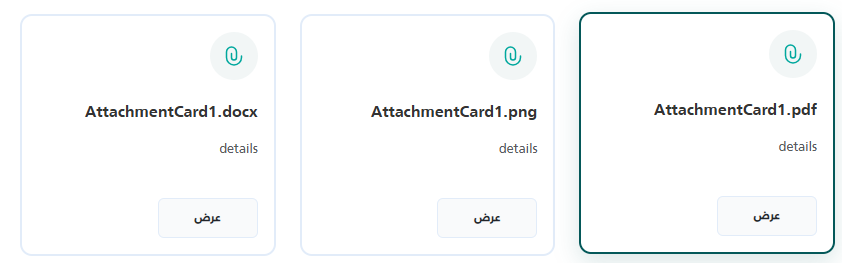 |
Location
Views/Shared/UI/_AttachmentCard.cshtml
Usage Examples
Basic Usage
The simplest way to use the component is by passing the minimal required fields, FileName and FileId. The component will infer the file type from the extension in the FileName (or FileId if provided as a URL).
@await Html.PartialAsync("UI/_AttachmentCard", new {
    FileName = "Contract.pdf",
    Details = "Signed copy of the main contract.",
    FileId = "15243"
})
Advanced Usage
You can optionally provide a hardcoded Id for the DOM element and override the backend endpoint that fetches the file using ActionUrl.
@await Html.PartialAsync("UI/_AttachmentCard", new {
    Id = "custom-contract-card",
    FileName = "Project_Requirements.docx",
    Details = "Initial drafted requirements.",
    FileId = "99824",
    ActionUrl = "/CustomController/DownloadAttachment" // Overrides default API
})
Properties
The component accepts an anonymous object with the following properties.
| Property | Type | Default Value | Description |
|---|---|---|---|
Id | string | Auto-generated (attachCard-{Guid}) | The internal DOM ID for the outermost container div. If not provided, a unique ID is automatically generated. |
FileName | string | Inferred from FileId | The main title of the file displayed in the card. Used to infer the preview FileType. If omitted, it will try to extract the file name from FileId. |
Details | string | "" | The subtitle or brief description shown right below the file name. |
FileId | string | "" | The unique identifier used to fetch the file from the backend, appended to the ActionUrl. It can also be a full direct URL to a file. |
ActionUrl | string | "/Common/PreviewAttachment" | The base endpoint called to fetch the file stream for the preview modal. By default, relies on the PreviewAttachment endpoint in the Common controller, but it can be overridden. |
Dependencies
This component relies on two other standard partial views to render previews and handle errors gracefully:
UI/_FilePreview: Handles displaying the preview overlay over the page.UI/_StatusModal: Triggers an info/warning popup if the requested file is missing.
(Both are automatically included at the bottom of the partial block).
@using Microsoft.AspNetCore.Routing
@model dynamic
@{
string Id = "";
string FileName = "";
string Details = "";
string FileId = "";
string actionUrl = "/Common/PreviewAttachment";

if (Model != null)
{
    var props = new RouteValueDictionary(Model);
    if (props.TryGetValue("Id", out var idProp)) Id = idProp?.ToString() ?? "";
    if (props.TryGetValue("FileName", out var titleProp)) FileName = titleProp?.ToString() ?? "";
    if (props.TryGetValue("Details", out var dProp)) Details = dProp?.ToString() ?? "";
    if (props.TryGetValue("FileId", out var fProp)) FileId = fProp?.ToString() ?? "";
    if (props.TryGetValue("ActionUrl", out var auProp) && !string.IsNullOrWhiteSpace(auProp?.ToString()))
        actionUrl = auProp.ToString()!;
}

// Display name fallback (used to compute FileName as well)
if (string.IsNullOrWhiteSpace(FileName))
{
    FileName = System.IO.Path.GetFileName(FileId ?? "").Split('?')[0];
}

// Infer type from file extension when FileType is not supplied
string GetExtensionType(string name, string url)
{
    var src = !string.IsNullOrEmpty(name) ? name : url ?? "";
    var ext = System.IO.Path.GetExtension(src).ToLowerInvariant().TrimStart('.');
    return ext switch
    {
        "pdf"                          => "pdf",
        "jpg" or "jpeg" or "png"
            or "gif" or "bmp"
            or "webp" or "svg"         => "image",
        "doc" or "docx"               => "word",
        "xls" or "xlsx" or "csv"      => "excel",
        _                              => "other"
    };
}

string FileType = GetExtensionType(FileName, FileId).ToLowerInvariant();

// Auto-generate a unique id when none is provided
if (string.IsNullOrWhiteSpace(Id))
Id = "attachCard-" + Guid.NewGuid().ToString("N").Substring(0, 8);
}

@if (!Html.ViewData.ContainsKey("AttachmentCardStyleRendered"))
{
Html.ViewData["AttachmentCardStyleRendered"] = true;
<style>
    .attachment-card {
        transition: all 0.3s ease;
        padding: 1rem;
        margin-bottom: 1rem;
        display: flex;
        gap: 1rem;
        flex-direction: column;
        justify-content: space-between;
        margin: 1rem 0;
    }

    .attachment-card:hover {
        transform: translateY(-2px);
        box-shadow: 0 8px 25px rgba(4, 88, 89, 0.15);
        border-color: #045859 !important;
    }

    .attachment-icon {
        display: flex;
        align-items: center;
    }

    .attachment-title {
        font-size: 1rem;
        line-height: 1.4;
    }

    .attachment-preview,
    .attachment-preview:hover,
    .attachment-preview:active,
    .attachment-preview:focus {
        background-color: #F9FAFB;
        border-color: #f9fafb;
        font-weight: bold;
        width: 100px;
        border: 1px solid #E2ECF9;
    }
</style>
}

<div id="@Id" class="attachment-card" style="border: 2px solid #E2ECF9; border-radius: 12px; background: white;">

    <svg xmlns="http://www.w3.org/2000/svg" width="48" height="48" fill="none" viewBox="0 0 48 48">
        <path fill="#045859" fill-opacity=".05"
            d="M0 24C0 10.745 10.745 0 24 0s24 10.745 24 24-10.745 24-24 24S0 37.255 0 24" />
        <path fill="#00a79d" fill-rule="evenodd"
            d="M21.5 15.75A4.25 4.25 0 0 0 17.25 20v5.5a6.75 6.75 0 0 0 13.5 0V24a.75.75 0 0 1 1.5 0v1.5a8.25 8.25 0 0 1-16.5 0V20a5.75 5.75 0 0 1 11.5 0v5.5a3.25 3.25 0 0 1-6.5 0v-4a.75.75 0 0 1 1.5 0v4a1.75 1.75 0 1 0 3.5 0V20a4.25 4.25 0 0 0-4.25-4.25"
            clip-rule="evenodd" />
    </svg>

    <div class="my-2 d-flex flex-column gap-2">
        <h6 class="text-dark fw-bold">@FileName</h6>
        <p class="text-muted small">@Details</p>
    </div>

    <button type="button" class="btn btn-sm attachment-preview"
            data-file-url="@FileId"
            data-file-type="@FileType"
            data-file-name="@FileName"
            onclick="openAttachmentFromUrl('@FileId', '@FileName', '@FileType')">
        عرض
    </button>
</div>

@await Html.PartialAsync("UI/_FilePreview")
@await Html.PartialAsync("UI/_StatusModal")

<script>
    if (typeof window.openAttachmentFromUrl === 'undefined') {
        window.openAttachmentFromUrl = function (id, fileName, fileType) {
            if (!id) {
                 showStatusModal({
                    type: 'info',
                    title: 'الملف غير متاح',
                });
                return;
            }

            let url = `@actionUrl/${ id }`;

            // Use the shared file viewer modal
            if (typeof showFilePreview === 'function') {
                showFilePreview(url, fileName, fileType);
            } else if (window.openPdfViewer) {
                window.openPdfViewer(url, fileName);
            } else {
                // Fallback: open in new tab
                window.open(url, '_blank');
            }
        };
    }
</script>